
Download Character Counter – Free Online Tool for Word & Character Counting
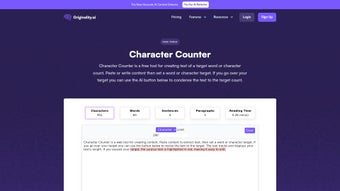
Maximize your writing efficiency with Character Counter, a powerful, AI-driven web application that helps writers, bloggers, students, and content creators maintain precision in their written content. Whether you're drafting a social media post, crafting a blog article, or preparing an academic paper, this free tool offers real-time word and character counting to ensure your message fits within strict limits. With intuitive design and instant feedback, Character Counter allows users to paste their text and instantly view detailed metrics such as word count, character count (with and without spaces), sentence and paragraph counts, and estimated reading time.
The tool also features a smart condensation function that automatically shortens text to meet your target, making it ideal for platforms with tight character limits like Twitter/X or LinkedIn posts. Its visual red highlighting for excess text streamlines editing, helping you stay on track without manual guesswork. No registration, no downloads, and no installation required—just open your browser and start writing smarter.
Built for seamless use on Windows, Mac, Android, and iOS, Character Counter is accessible from any device with internet access, making it a secure, reliable, and always-updated solution for modern content creators.
Key Features of Character Counter
Character Counter stands out in the crowded field of writing tools by combining simplicity with advanced functionality. One of its most powerful features is real-time text analysis, which updates counts instantly as you type or paste content. This ensures that writers never miss a beat when working under tight constraints. The tool provides a comprehensive breakdown of your text, including word count, character count (with and without spaces), sentence count, paragraph count, and an accurate reading time estimate—perfect for optimizing content for engagement and readability.
Another standout feature is the smart condensation tool. When your text exceeds the target limit, a single click triggers an AI-powered summarization that trims unnecessary words while preserving the core meaning. This is especially useful for social media managers who need to fit content into 280 characters on X (formerly Twitter), or for students writing essays with strict word limits. The tool also highlights overages in red, making it easy to identify and edit excess content at a glance.
Character Counter goes beyond basic metrics by offering content-type-specific recommendations. For instance, it suggests ideal word counts for blog posts (800–1,200 words), social media captions (100–150 words), and academic abstracts (150–250 words). These insights help users align their writing with platform standards and audience expectations. Additionally, the tool supports multiple languages and is fully responsive, ensuring a smooth experience across desktops, tablets, and smartphones. With no ads, no tracking, and no data storage, Character Counter prioritizes user privacy and security, making it a trustworthy companion for anyone serious about precise writing.
How to Use Character Counter: Simple Installation & Setup
One of the biggest advantages of Character Counter is its zero-installation requirement. Since it’s a web-based application, you don’t need to download or install any software. To get started, simply open your preferred web browser—Chrome, Firefox, Safari, Edge, or any modern browser—and navigate to the Character Counter website. Once loaded, you’ll see a clean, minimalist text input box ready for your content.
Begin by pasting your draft text into the box. As you type or paste, the tool instantly calculates and displays key metrics: word count, character count (with and without spaces), sentence count, paragraph count, and estimated reading time. If your content exceeds a predefined target (e.g., 150 words for a Twitter post), the tool will highlight the excess text in red, signaling where edits are needed.
To refine your content, click the “Condense Text” button. The AI engine will analyze your text, remove redundancies, simplify phrasing, and shorten the content to meet your target. You can adjust the target count manually at any time, allowing for flexibility across different projects.
The tool also includes a “Reset” function to clear your text and start fresh. Because it runs entirely in your browser, no data is sent to external servers, ensuring your content remains private and secure. Whether you're writing on a Windows PC, Mac, Android tablet, or iOS phone, the interface adapts seamlessly to your screen size, providing a consistent experience across all devices.
Compatibility & System Requirements
Character Counter is designed for universal accessibility, making it compatible with nearly every modern device and operating system. It runs flawlessly on Windows 10 and later, macOS (Big Sur and newer), Android 8.0+, and iOS 14+. Since it’s a web application, there are no specific hardware requirements—any device with a stable internet connection and a modern browser can use it effectively.
The tool leverages HTML5, CSS3, and JavaScript to deliver a fast, responsive interface without relying on plugins or third-party software. This means you can use Character Counter on laptops, desktops, tablets, and smartphones without performance issues. It supports all major browsers, including Google Chrome, Mozilla Firefox, Apple Safari, Microsoft Edge, and Opera. There are no compatibility conflicts or crashes, even when handling large text inputs.
For users who frequently switch between devices, Character Counter offers a cross-platform experience. Your work isn’t saved on the server, but you can copy and paste your text across devices effortlessly. This makes it ideal for remote teams, students working on shared assignments, or writers who prefer writing on their phone during commutes. The tool is also mobile-optimized, with touch-friendly buttons and a scrollable interface that works smoothly on smaller screens. Whether you're on a 13-inch MacBook or a 6.7-inch iPhone, the layout adjusts perfectly to your device, ensuring a seamless experience every time.
Pros and Cons of Character Counter
Pros
- Free to use with no hidden fees or subscription models.
- Real-time counting for words, characters, sentences, and reading time.
- AI-powered condensation to shorten text while preserving meaning.
- Red highlighting for overages, making editing intuitive and fast.
- No installation required—works directly in your browser.
- Privacy-first—no data is stored or shared.
- Multi-device compatible—works on Windows, Mac, Android, and iOS.
- Content-specific recommendations for blogs, social media, and academic writing.
Cons
- No offline mode—requires internet access to function.
- Basic formatting options; not suitable for full document editing.
- AI summarization may not always capture nuanced tone or context.
- Not ideal for long-form documents with complex formatting needs.
Frequently Asked Questions (FAQ)
Final Verdict & Call to Action
Character Counter is a must-have tool for anyone who values precision in writing. Its combination of real-time analytics, smart AI condensation, and user-friendly design makes it ideal for bloggers, students, social media managers, and content creators across all platforms. The fact that it’s completely free, secure, and accessible from any device with a browser sets it apart from many paid alternatives. While it doesn’t replace full-featured word processors, it excels at one critical task: helping you stay within word and character limits without sacrificing clarity.
Whether you're crafting a tweet, writing a research abstract, or editing a blog post, Character Counter delivers instant feedback and actionable insights. With its intuitive interface, strong privacy focus, and cross-device compatibility, it’s a reliable companion for modern writers. If you’re looking for a fast, secure, and effective way to optimize your content, don’t wait—download and start using Character Counter today for free.



.png)



